Compatible with Chrome and Edge
Instruction Guide
We have a simple tutorial guide which explains the features of the software extension and what each button inside the extension does. Read our tutorial and welcome guide on how to use the extension to the fullest. Use all the features of this browser software.
If you are interested in other web extensions to install, you might wish to check out the Microsoft Bing Search with Rewards extension.
Microsoft Bing Search with Rewards Extension
It allows you to complete daily offers to get points.
Track the number of points you have currently and the rewards you can redeem with these points.
The ways to get points & get rewarded is search with Bing, browse with Microsoft Edge and shop at the Microsoft and Windows stores to earn rewards.
Sponsored Link:
Other useful extensions
Another extension which would be useful to install is the iCloud bookmarks extension.
It allows to keep your Chrome bookmarks on Windows synced up with the Safari bookmarks on your iPhone, iPad, and Mac.
iCloud will store your website bookmarks so it is accessible even on your iPhone and Mac.
Try these other two extensions and see if it will boost your daily productivity.
- Up to 600 % volume boost
- Control volume of any tab which playng sound
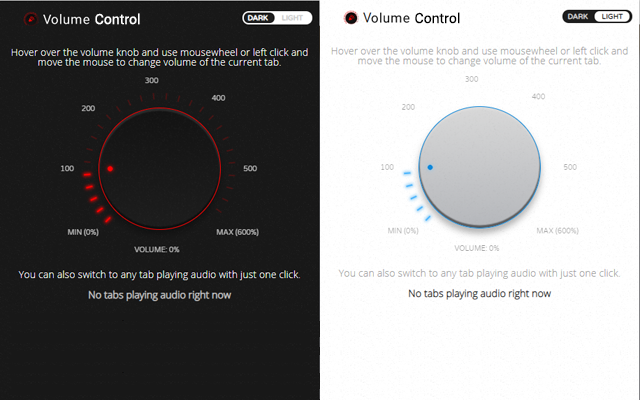
- Easy to use volume knob which use mousewheel to change volume of the current tab
- Fine-grained control: 0% - 100% - 200% - 300% - 400% - 500% - 600%
- Switch to any tab playing audio with just one click
- Light & Dark theme switcher
Features:
How can you boost the volume of Youtube videos?
There are several ways to boost the volume of YouTube videos, including:
Use the volume controls on your computer or device. This is a simple way to increase volume on a video that has already been uploaded to YouTube.
Download and use VLC player. The free media player VLC boasts an equalizer, which lets you adjust the volume of all kinds of media files. It also comes with a number of other useful tools, such as subtitles and subtitles editor, video effects and filters, support for many file formats, streaming options (including online streaming), DVD playback functionality and more.
Use Audacity to boost volume in MP3 files that are already on your computer. Audacity is a free audio editing tool that allows you to edit multiple tracks at once from within one project window or create new ones from scratch by importing existing audio tracks from different sources such as CDs and tapes (as well as digital media files).The software also comes with a built-in mixer that lets you control overall levels so you don’t have to make adjustments manually during playback; instead it does this automatically for you so that each line has similar loudness across all channels.
If you've ever watched a movie through iTunes on your Mac, you've probably noticed that the sound quality is lower than what you'd get from a Blu-ray or DVD. That's because iTunes doesn't support AC3 or DTS surround sound, so it only outputs stereo audio (two channels) in MP4 files.
The good news is that there are apps that can boost the volume of movies and TV shows that come in MP4 format. And they're really easy to use.
Here is one desktop app that will let you play back your high-quality video files in full stereo surround sound:
VLC Media Player (free)
VLC Media Player has been around for years, but it continues to be one of the best media players out there. It's open source and available on Windows, Mac, Linux, and mobile platforms such as Android and iOS.
VLC lets you play back any type of video file — even those that don't have support built in — as well as DVDs and network streams such as YouTube videos. And if you want to boost the volume of videos downloaded from Netflix or Hulu Plus, VLC can do that too with its built-in equalizer function
Tutorial:
- Install the Extension
-
After installing the extension, click on the icon
 on the toolbar.
Sponsored Link: